Working prototype
Your tracker lost its screen.
Put one on the wall.
The Fitbit Air is a pebble with no display. Great for sleeping in, useless mid-set — the one moment you actually want the number. HeartHertz is a small wall-mounted screen that pairs to it over Bluetooth and shows your live BPM and training zone, readable from the other side of the garage.
US$149 when it ships. Waitlist is free — no payment, no obligation.
Working prototype, built and running on a wall in Whangārei.
Live simulation — BPM, zone, 30‑minute max, zone‑coloured history
The gap
Screenless is brilliant — until you're training
Screenless trackers won the comfort argument. You forget you're wearing one, it lasts a week, it doesn't buzz at you. The trade is that during a session your heart rate is invisible unless you stop, dry your hands and unlock your phone.
- Google's own answer is to share your heart rate to gym equipment — which works, if you happen to be standing on a treadmill.
- Kettlebells, barbells, rower, floor work, the driveway. No screen anywhere.
- Propping your phone on a bench: it sleeps, it slides off, and the app has to stay in the foreground.
- Checking afterwards tells you what your session was. It can't change what it becomes.
You didn't reject the screen.
You rejected it being on your wrist.
That's the whole idea behind HeartHertz. Keep the thing on your arm small, light and screenless — the reason you bought it. Put the screen on the wall, where you look at it only when you want to.
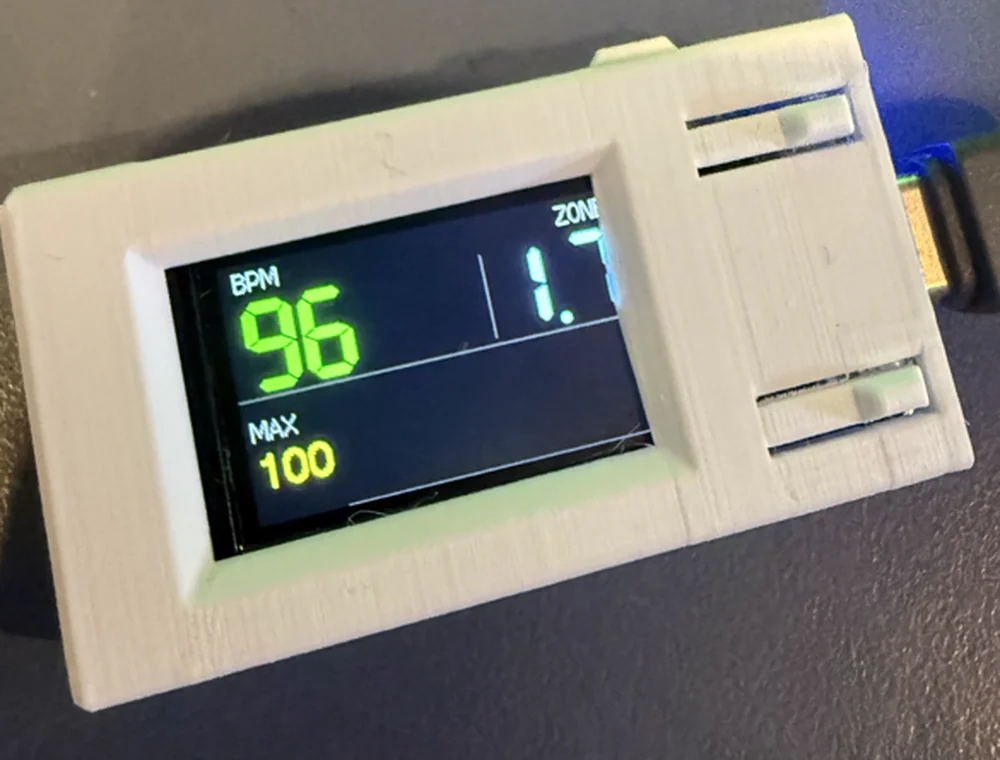
The prototype on the wall. BPM top‑left, zone top‑right, 30‑minute max bottom‑left.
How it works
Three steps, then never again
HeartHertz plays the same role a treadmill does: it's a standard Bluetooth heart‑rate receiver. Your tracker thinks it's a piece of gym equipment, because as far as the protocol is concerned, it is.
Turn on sharing
In the Google Health app, tap Connections → Share heart rate. Your tracker starts broadcasting as a standard BLE heart‑rate device.
Pick it off the list
HeartHertz appears in your equipment list by name. Confirm once. It remembers, and reconnects on its own from then on.
Look up
Live BPM, your zone, and a scrolling colour-coded history. Set your age on the device once and every zone boundary follows it.
The number that matters
It shows the zone, not just the BPM
A raw number means nothing without context. HeartHertz shows a decimal — the whole number is your zone, the tenth is how far through it you are. 1.7 means you're deep into zone 1 and about to tip into zone 2. You can read your drift without doing arithmetic between reps.
Two builds
One at arm's length, one across the room
Both run the identical Bluetooth core. They differ only in what they draw on.
135×240 colour display
The full picture: big BPM, big zone decimal, a 30‑minute rolling max, and a scrolling history graph coloured by zone — cyan through green, yellow, orange, red. Best on a wall you pass close to, or beside the rower.
It boots to the mascot, asks your age once, then gets out of the way.

The boot splash, before it hands over to live BPM
32×8 LED matrix
Fewer pixels, far more range. A zone digit, a bar that fills as you climb through that zone, and your BPM — in LEDs bright enough to read from the far corner of a garage gym. No graph, no history. Just the number and the zone, mid‑set.
Each unit advertises a unique name, so two of them on the same wall don't fight over which is yours.
Zone digit · position-in-zone bar · BPM
Honest market check
What else does this today?
We went looking for something you could just buy instead, and came back with nothing that hangs on a wall. Here is the whole list anyway, including the two that genuinely undercut us on price — because you'd find them eventually and we'd rather you heard it here.
| What it is | Price | Why it isn't this |
|---|---|---|
| Myzone MZ‑60 | US$160 | The closest thing that exists: a watch whose whole job is displaying heart rate and zone from a sensor you already wear. Genuinely good. But it reads the MZ‑3 chest belt — so it's only an option if you're willing to buy into a second sensor you don't need, and strap it to your chest. |
| Coospo HW9 armband | US$60 | Cheaper than us, and it works: five coloured LEDs on the band tell you your zone. It's also a whole second heart‑rate sensor on your other arm. If you've just bought a tracker you love, buying another tracker to read the first one is a strange place to end up. |
| Cardio machines | Free, if you own one | Life Fitness, Technogym, Peloton and the rest — the officially supported home for heart‑rate sharing. Excellent, right up until you step off the machine. No help at all with a barbell, a kettlebell or a mat. |
| Studio group systems | Venue pricing | Myzone club displays, Spivi Arena, Polar Club. Big screens for a whole class, sold to gyms, usually tied to their own straps and a subscription. Nobody sells you one for a garage. |
| Your phone on the bench | Free | The real free competitor, and the reason most people put up with the problem. It also sleeps, slides off, needs the app in the foreground, and wants clean dry hands. |
| DIY it | A weekend | Adafruit's BLE Heart Rate Zone Trainer, orbitrack_esp32 and friends. Proof the itch is real — people keep scratching it. They're parts lists and tutorials, not something you mount and forget about. |
The pattern is hard to miss. Every one of them solves it by putting another thing on your body — which is the one thing you were trying to get away from.
Straight up
What it can't do
We pulled apart exactly what the Fitbit Air exposes over Bluetooth. Beats per minute is genuinely all of it. Anyone promising you more from this device over BLE is guessing.
- No HRV. The Air never sends beat‑to‑beat intervals, so heart rate variability is impossible from it. A proper chest strap does send them — and HeartHertz will read those too.
- No watch battery percentage. It isn't published over Bluetooth. We checked, including the undocumented characteristics.
- No steps, sleep or SpO₂. Those live behind an encrypted, key‑gated channel nobody has opened.
- Sharing has to be on. If the share session drops, the fix is on your phone, not on the wall — toggle Share heart rate off and back on.
- It isn't a medical device and it isn't for sale yet. It's a working prototype on a wall.
Under the case
Specifications
- Works with
- Any device broadcasting the standard Bluetooth Heart Rate Service — Fitbit Air, other Fitbits, chest straps, most watches with a broadcast mode
- Radio
- Bluetooth Low Energy, connecting as a central. Matches on service, not address, so it survives the privacy‑rotating addresses trackers use
- Displays
- 135×240 colour IPS, or a 32×8 LED matrix
- On screen
- Live BPM, zone as a decimal, 30‑minute rolling max, zone‑coloured scrolling history
- Zones
- Five, from your max heart rate. Age set on the device and saved — no phone, no app, no account
- Reconnect
- Automatic, plus a watchdog that resumes scanning if the link stays up but the readings stop
- Power
- USB‑C. Mount it near a socket and leave it
- Data
- Stays between your wrist and the wall. Nothing is uploaded, no account, no cloud
Questions
The obvious ones
Do I need my phone nearby?
Yes, while sharing is running. Your tracker's share mode is started from the Google Health app, and the phone keeps that session alive. HeartHertz itself needs nothing — no app, no account, no WiFi.
Does it work with anything other than a Fitbit?
Yes. It listens for the standard Bluetooth Heart Rate Service, which is what chest straps, most sports watches and gym equipment all speak. If a treadmill can read your heart rate, so can this. A chest strap will also unlock beat‑to‑beat data the Fitbit can't provide. We build for the Air first because that's the tracker with no screen at all.
Why not just buy a cheap armband with zone lights?
Fair question, and if you don't already own a tracker it's the better buy — the Coospo HW9 does zone colours for about US$60. The catch is that it's a whole second heart‑rate sensor. You'd be wearing one tracker to read another, on the other arm. If you've already got something you like on your wrist, adding a screen to the room is a cleaner answer than adding hardware to your body.
How far away can I read it?
The colour build is comfortable at a few metres — beside a rower or a bench. The LED matrix build is the one for across the room. That's the whole reason it exists.
Why show a decimal instead of just "Zone 2"?
Because a whole number hides the drift. Sitting at 2.1 and sitting at 2.9 feel very different and lead to very different sessions, but both read as "zone 2". The tenth tells you which way you're heading before you cross over.
It's connected but the number is frozen. What now?
Your tracker is still advertising but has stopped streaming. Toggle Share heart rate off and back on in the app. Also check the tracker is actually on skin — no contact, no reading.
What will it cost?
US$149, one‑off. No subscription and no account — there's no cloud service behind it to pay for. Shipping and any local taxes would be on top of that.
Can I buy one today?
No. It's a working prototype, not a manufactured product, and there's no ship date yet. The waitlist is free, takes one field, and commits you to nothing — it's how we work out whether to build a batch at all. If you have a view on which build you'd want, pick it on the form; that genuinely decides what gets made first.
Train by the number, not by feel
Glance up mid‑set and know whether you're actually in the zone you meant to be in — or whether you've been coasting in zone 2 for twenty minutes telling yourself it's a hard session. That's the whole product.
- Your live BPM and zone, readable across the room
- Set your age once on the device — it remembers
- Works with the Fitbit Air, other trackers, and chest straps
- Nothing leaves the room. No cloud, no app, no login
Joining the waitlist is free and commits you to nothing. You'll hear when there's a real ship date — and you'll get first refusal before it goes wider.